
Podcast Player - Castbox
Castbox.FM - Radio & Podcast & AudioBooksMusic & Audio
4.729.09K Reviews
- Version
- 11.25.0-260714314
- Installs
- 10.00M
- Age Rating
- Teen
Screenshots
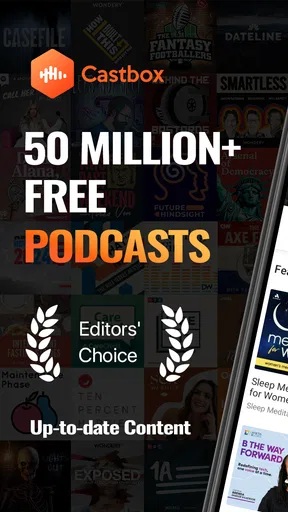
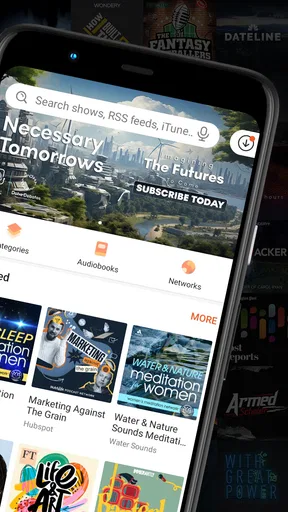
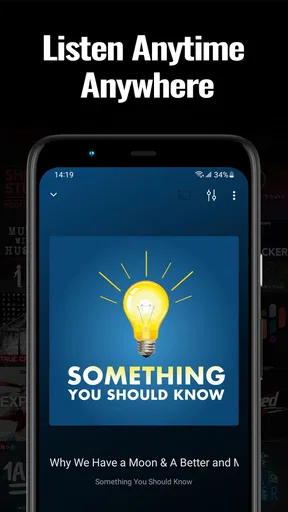
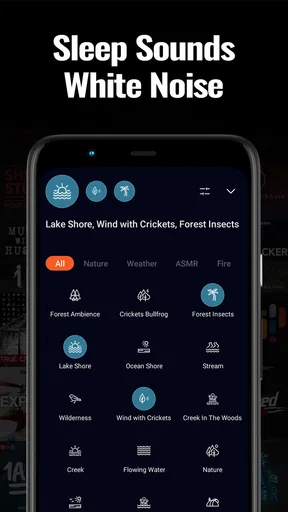
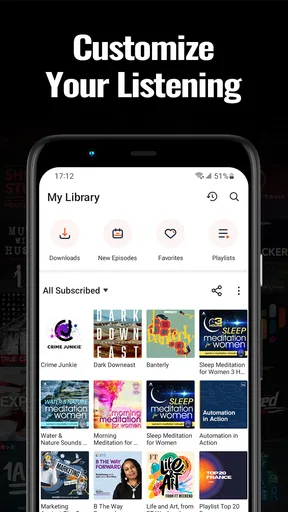
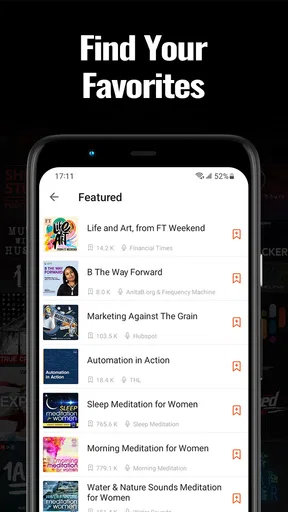
Our Review of Podcast Player - Castbox
 Analysis by Appyee
I tend to judge a podcast app by what happens after the first few subscriptions: can I find the next episode quickly, keep track of several shows, and make listening fit the gaps in an ordinary day? Castbox works best when I treat it as a small listening routine rather than an endless catalogue. I can browse when I have time, then rely on familiar shows and saved episodes when I’m heading out.
A listening routine that stays manageable
My most useful habit is to subscribe selectively. A promising show can look appealing in search, but subscribing to everything makes a feed harder to scan. I prefer to try an episode first, then follow the show if its pace and subject suit me. That keeps the home screen useful instead of turning it into a backlog I feel obliged to clear.
Downloads also work better with a little planning. Before a commute or a walk where reception may be unreliable, I choose the episodes I actually expect to hear rather than saving a long queue “just in case.” That makes offline listening practical and helps me avoid scrolling through a pile of downloaded choices when I have only a short break.
Small settings that change the experience
Playback speed is worth adjusting to the show, not applying as a rule. A conversational interview can remain easy to follow at a quicker pace, while a detailed story or a language-heavy discussion may deserve normal speed. I find that changing speed deliberately is more comfortable than trying to squeeze every podcast into the same listening window.
The silence-skipping option can be useful for talk shows with long pauses, but it is not automatically right for every episode. Pauses are sometimes part of a speaker’s delivery, and removing them can make reflective or dramatic material feel rushed. I’d switch it on for a practical discussion and turn it off when timing and atmosphere matter.
The sleep timer is another setting I’d use with intention. It suits a familiar, low-key episode at bedtime, while a new mystery or a story with a carefully built ending is a poor match if the timer might stop playback before I’m ready. It is a simple way to avoid losing my place overnight, not a substitute for choosing something suitable to fall asleep to.
Faster habits for busy days
For a repeatable morning routine, I’d keep a few dependable shows easy to reach and use recommendations as a discovery tool, rather than letting suggestions dictate the whole queue. When I have ten minutes, a short episode from a familiar feed is a safer choice than starting something that needs close attention and may be interrupted.
In-Audio Search is most useful when I remember a topic but not its timestamp. If I’m revisiting a long episode to find a particular discussion, searching within the audio can be more direct than dragging through the timeline and hoping to land in the right spot. I still treat the result as a way to locate a passage, not as a reason to skip listening around it when context matters.
Where the convenience has limits
Castbox combines listening, discovery, downloads, and social discussion, which is convenient if I want those activities in one place. That breadth also means it may feel busier than a very plain player built mainly around a personal feed. If I already know exactly what I listen to and want as little discovery or community activity as possible, a simpler podcast app may suit me better.
Community features are optional in spirit, even if they add another layer to the experience. I would use comments when I genuinely want to see what other listeners noticed, but I wouldn’t make them part of every listening session. The episode itself should remain the focus; discussion is an extra, and its value will vary from show to show.
There is a similar trade-off with recommendations. They can help when I want to branch out from my usual subjects, but a suggested show is still only a starting point. I’d sample an episode before subscribing, especially if I’m trying to keep my listening list short and relevant.
Ever found yourself overwhelmed by the sheer number of podcast apps out there? Well, I recently took Podcast Player - Castbox for a spin, and let me tell you, it’s like having a personal radio station in your pocket. Let's dive into why this app might just be your new favorite way to consume podcasts.
Exploring the Interface
First off, the user interface is super intuitive. From the moment you open Podcast Player - Castbox, you’re greeted with a clean and organized home screen. Everything is laid out in a way that’s easy to navigate, even if you’re new to the world of podcasts. The search function is powerful and snappy—type in a keyword, and boom! You’re presented with a plethora of options.
The design is sleek, with a minimalist vibe that’s easy on the eyes. I love how the app uses a combination of big, bold images and straightforward text. It makes finding and selecting podcasts a breeze. Plus, you can customize your homepage to feature your favorite shows, which means less time searching and more time listening.
Feature-Packed Listening Experience
Now, let’s talk features. One of the standout aspects of Castbox is the sheer number of features packed into this little app. Whether you’re a casual listener or a podcast junkie, there’s something here for everyone.
- In-App Audio Effects: Adjust the playback speed or skip silences with ease. This is perfect for those of us who like to binge content but are short on time.
- Personalized Recommendations: The app learns from your listening habits and suggests new content you might love. It’s like having a friend who always knows what you’re in the mood to hear.
- Offline Listening: Download episodes to listen to on the go. Say goodbye to data worries during your commute or workout.
One feature I found particularly handy is the sleep timer. If you’re like me and enjoy falling asleep to a soothing podcast, this is a game-changer. Just set the timer, and the app will pause your episode automatically. No more waking up to hours of missed content!
Community and Social Features
Castbox isn’t just about listening; it’s about connecting. The app has a robust community feature that allows you to engage with other listeners. You can comment on episodes, join discussions, and even create your own podcast if you’re feeling inspired.
There’s also a nifty feature called “In-Audio Search.” Imagine searching for specific topics or phrases within an episode. It’s perfect for those times when you want to revisit a particular segment but can’t remember where it was.
Room for Improvement?
No app is perfect, and while Castbox is pretty close, there are a few tweaks I’d love to see. Occasionally, the app can lag when loading particularly long episodes or when there’s an update. It’s not a deal-breaker by any means, but a bit of an inconvenience when you’re in a hurry.
Also, while the app is free, some features are locked behind a premium subscription. It’s fairly priced, but if you’re on a tight budget, this might be something to consider.
Overall, though, these are small potatoes compared to the wealth of features and user-friendly design.
Final Thoughts
In a sea of podcast apps, Podcast Player - Castbox stands out for its ease of use, robust features, and community-centric approach. Whether you’re a podcast newbie or a seasoned listener, this app is worth a try. The personalized recommendations and seamless interface make it a joy to use, and the social features add a layer of interaction that’s refreshing.
So, if you’re ready to elevate your podcast game, head over to your app store and give Castbox a download. Happy listening!
Who gets the most from Castbox
I’d recommend Castbox to someone who moves between discovery and deliberate listening: perhaps they follow a handful of regular shows, but also want to search for a fresh topic now and then. Its mix of subscriptions, recommendations, audio controls, and episode discussion gives that kind of listener room to explore without needing a separate app for every part of the process.
It is also a sensible fit for people whose listening time comes in uneven slices. A downloaded episode can cover a train ride, a walk, or a stretch of chores, while speed controls can help make a long conversation fit a limited window. If you mostly listen at home and enjoy following a subject through different voices, the search and recommendation options can help you build a varied queue.
I’d be less enthusiastic about it for someone who wants a bare-bones player and already has a fixed list of shows. A minimalist alternative may be easier if all you need is a feed and basic playback, with no interest in comments or recommendations. Likewise, listeners who mainly want music or audiobooks should look for an app designed around those formats rather than expecting a podcast-first player to replace every audio service.
How it compares with familiar podcast players
Compared with a basic podcast player, Castbox puts more emphasis on finding material and interacting around it. That can be a real advantage when I’m curious but don’t have a show in mind. The trade-off is that a focused player can feel calmer and quicker when I simply want to resume the next episode in a familiar series.
Against a platform whose recommendations dominate the experience, Castbox still lets me shape a personal routine through subscriptions and a customized homepage. I’d use discovery to widen my options, then rely on my own choices for everyday playback. That balance matters: recommendations are helpful when they lead to something worthwhile, but they shouldn’t turn listening into an endless browse.
Its social side is another point of difference from apps that treat podcasts as a purely private queue. Episode comments can add context or show how other listeners reacted, but they are not essential to enjoying the audio. If you prefer to listen without a community layer, you can simply keep your attention on the episode and treat discussion as an occasional extra.
Practical choices before settling in
A realistic weekday pattern might look like this: I check a few subscriptions before leaving home, download one episode for a commute, and save a more involved show for a time when I can pay attention. Later, if a detail from that show comes back to me, I try In-Audio Search rather than scrubbing randomly. At night, a familiar, gentle episode and the sleep timer make more sense than a tense story I would hate to have cut off.
That routine also highlights a useful distinction: downloaded listening is convenient, but it still rewards choosing in advance. When I’m going out, I’d make sure the episodes I want are downloaded and not assume every listening situation will have a reliable connection. For a last-minute change of plans, a smaller, carefully chosen offline queue is easier to manage than a huge collection of episodes.
New users may wonder whether they need to pay before the app becomes useful. Castbox is free to download, while in-app purchases range from $0.99 to $99.99 per item. I’d start with the free experience and decide whether any paid option addresses a specific need, rather than treating a purchase as a necessary first step. The app is rated Teen, a point parents may want to consider when choosing audio apps for younger listeners.
The app comes from Castbox.FM - Radio & Podcast & AudioBooks, and it sits squarely in the music and audio space, with podcasts as its central focus. It has a 4.7 average from around 374,000 ratings, and more than 10 million installs. Those figures suggest it is widely used, but they don’t tell me whether its discovery style or social layer will suit an individual listener; the best test is whether its everyday workflow feels comfortable.
What to expect over time
Castbox was released on April 15, 2017, and version 11.24.0-260114369 requires Android 6.0 or later. I’d still judge the experience by how it behaves on a particular device and by whether the interface fits my habits. An occasional slowdown, especially around a long episode or an update, is worth keeping in mind if you depend on quick playback at a precise moment.
There are enough controls here to make a repeatable listening setup, but the app does not remove the need to choose thoughtfully. I’d keep the home screen focused, adjust speed and silence skipping according to the episode, and use downloads for planned offline time. Those small decisions make a fuller app feel much less cluttered.
A considered recommendation
For me, Castbox is strongest when I want one place to search, subscribe, listen offline, and occasionally join a conversation about an episode. It is not automatically the best choice for someone who values simplicity above discovery or never uses community features, and a more stripped-back player may be a better match in that case.
Verdict
Strengths of Podcast Player - Castbox
- User-friendly interface with intuitive navigation.
- Vast podcast library across diverse genres.
- Offline listening for convenience on the go.
- Customizable playback speed options.
- Automatic download of new episodes.
Limitations of Podcast Player - Castbox
- Occasional ads in the free version can be intrusive.
- Some features require a premium subscription.
- May experience occasional playback issues.
- Limited support for certain niche podcasts.
- App size can be a bit large for some devices.
Other Releases by Castbox.FM - Radio & Podcast & AudioBooks
View All
Podcast Player
News & Magazines4.8
Similar Picks in This Category
View All
YouTube Music
Google LLC4.4

Samsung Music
Samsung Electronics Co., Ltd.3.8

Spotify: Music and Podcasts
Spotify AB4.3

JioSaavn - Music & Podcasts
Saavn Media Limited4.3

Lark Player:Music Player & MP3
Lark Player Studio - Music, MP3 & Video Player4.6

StarMaker: Sing Karaoke Songs
SKYWORK AI PTE. LTD.4.3
Frequently Asked Questions
What features does Podcast Player - Castbox offer?
Podcast Player - Castbox provides a wide range of features, including access to millions of podcasts across various genres, personalized recommendations, and the ability to download episodes for offline listening. Users can create playlists, leave comments, and interact with the community. The app also supports Chromecast and Amazon Echo for seamless integration with home devices.
Is Podcast Player - Castbox free to use?
Yes, Podcast Player - Castbox is free to download and use. However, it offers a premium subscription, Castbox Premium, which provides additional features such as ad-free listening, advanced search filters, and exclusive content. Users can choose between monthly or yearly subscription options if they wish to upgrade.
How does the app handle data privacy and security?
Podcast Player - Castbox is committed to user privacy and security. It employs encryption to protect user data and follows strict privacy policies. Users can manage their data through account settings, and the app complies with GDPR and other privacy regulations to ensure that personal information is handled responsibly.
Can I listen to podcasts offline with Podcast Player - Castbox?
Yes, Podcast Player - Castbox allows you to download episodes for offline listening. This feature is particularly useful for users who want to save on data usage or listen to their favorite shows without an internet connection. Simply choose the download option next to an episode to store it on your device.
What devices are compatible with Podcast Player - Castbox?
Podcast Player - Castbox is compatible with both Android and iOS devices, making it accessible to a wide range of users. Additionally, it supports playback on Chromecast and Amazon Echo, allowing you to listen to podcasts through various home entertainment systems. Ensure your device meets the app's system requirements for optimal performance.
